







Service

We deliver not just CNC machine tools, but also peace of mind and worry-free service.
Service

Frequently Asked Questions .

CNC Machine Tools
  • CNC Drilling and Tapping Machines
  • CNC Turning and Milling Machine
  • CNC Vertical Machining Center
  • Small 5-Axis CNC Machining Center
Machining Centers
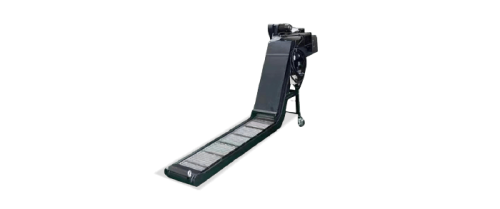
  • Chip Conveyor For CNC Machine
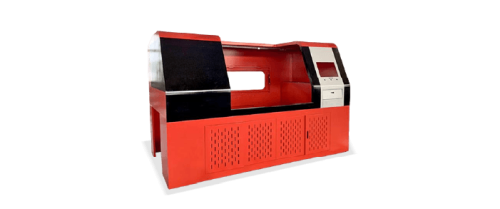
  • CNC Machine Enclosure
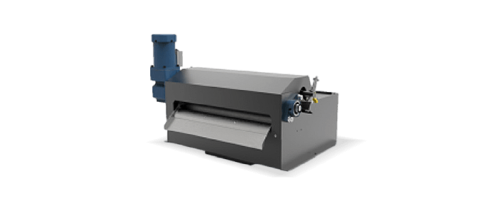
  • Magnetic Separator For CNC Machine
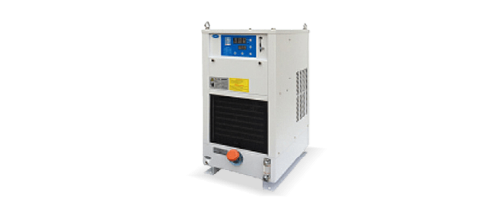
  • Oil Cooler For CNC Machine
  • Paper Bag Filter For CNC Machine
Machine won’t start:how to troubleshoot?

The machine home position is the system's initial reference point, which needs to be manually or automatically returned to the home position. The workpiece origin, on the other hand, is a reference point set on the workpiece based on the machining requirements. The tool is moved to the workpiece reference position, and this point is set as the workpiece coordinate origin. Different workpiece origins are typically set using G54 to G59 commands.Steps to exclude

  1. Return to machine home position: Select manual mode or use the "Return to Home" function on the control panel to move the machine to the home position.
  2. Verify the machine home position: Check the machine coordinates displayed on the controller to ensure they correspond to the home position. If the machine cannot return to the home position, check the limit switches or sensors.
  3. Set the workpiece origin: Move the tool to the workpiece reference point, and set that position as the workpiece origin on the controller. Use the G54 to G59 commands to set different workpiece origins.
  4. Perform a test run: After setting the origin, perform a test run to ensure the origin setting is correct and to avoid positional errors that could lead to machining mistakes.
What are the reasons for unstable machining accuracy?

The machine home position is the system's initial reference point, which needs to be manually or automatically returned to the home position. The workpiece origin, on the other hand, is a reference point set on the workpiece based on the machining requirements. The tool is moved to the workpiece reference position, and this point is set as the workpiece coordinate origin. Different workpiece origins are typically set using G54 to G59 commands.Steps to exclude

  1. Return to machine home position: Select manual mode or use the "Return to Home" function on the control panel to move the machine to the home position.
  2. Verify the machine home position: Check the machine coordinates displayed on the controller to ensure they correspond to the home position. If the machine cannot return to the home position, check the limit switches or sensors.
  3. Set the workpiece origin: Move the tool to the workpiece reference point, and set that position as the workpiece origin on the controller. Use the G54 to G59 commands to set different workpiece origins.
  4. Perform a test run: After setting the origin, perform a test run to ensure the origin setting is correct and to avoid positional errors that could lead to machining mistakes.
How to handle cooling system issues on a lathe?

The machine home position is the system's initial reference point, which needs to be manually or automatically returned to the home position. The workpiece origin, on the other hand, is a reference point set on the workpiece based on the machining requirements. The tool is moved to the workpiece reference position, and this point is set as the workpiece coordinate origin. Different workpiece origins are typically set using G54 to G59 commands.Steps to exclude

  1. Return to machine home position: Select manual mode or use the "Return to Home" function on the control panel to move the machine to the home position.
  2. Verify the machine home position: Check the machine coordinates displayed on the controller to ensure they correspond to the home position. If the machine cannot return to the home position, check the limit switches or sensors.
  3. Set the workpiece origin: Move the tool to the workpiece reference point, and set that position as the workpiece origin on the controller. Use the G54 to G59 commands to set different workpiece origins.
  4. Perform a test run: After setting the origin, perform a test run to ensure the origin setting is correct and to avoid positional errors that could lead to machining mistakes.
How to handle poor workpiece surface roughness?

The machine home position is the system's initial reference point, which needs to be manually or automatically returned to the home position. The workpiece origin, on the other hand, is a reference point set on the workpiece based on the machining requirements. The tool is moved to the workpiece reference position, and this point is set as the workpiece coordinate origin. Different workpiece origins are typically set using G54 to G59 commands.Steps to exclude

  1. Return to machine home position: Select manual mode or use the "Return to Home" function on the control panel to move the machine to the home position.
  2. Verify the machine home position: Check the machine coordinates displayed on the controller to ensure they correspond to the home position. If the machine cannot return to the home position, check the limit switches or sensors.
  3. Set the workpiece origin: Move the tool to the workpiece reference point, and set that position as the workpiece origin on the controller. Use the G54 to G59 commands to set different workpiece origins.
  4. Perform a test run: After setting the origin, perform a test run to ensure the origin setting is correct and to avoid positional errors that could lead to machining mistakes.
How to address poor surface roughness of the workpiece?

The machine home position is the system's initial reference point, which needs to be manually or automatically returned to the home position. The workpiece origin, on the other hand, is a reference point set on the workpiece based on the machining requirements. The tool is moved to the workpiece reference position, and this point is set as the workpiece coordinate origin. Different workpiece origins are typically set using G54 to G59 commands.Steps to exclude

  1. Return to machine home position: Select manual mode or use the "Return to Home" function on the control panel to move the machine to the home position.
  2. Verify the machine home position: Check the machine coordinates displayed on the controller to ensure they correspond to the home position. If the machine cannot return to the home position, check the limit switches or sensors.
  3. Set the workpiece origin: Move the tool to the workpiece reference point, and set that position as the workpiece origin on the controller. Use the G54 to G59 commands to set different workpiece origins.
  4. Perform a test run: After setting the origin, perform a test run to ensure the origin setting is correct and to avoid positional errors that could lead to machining mistakes.
How to use a fixture to secure the workpiece?

The machine home position is the system's initial reference point, which needs to be manually or automatically returned to the home position. The workpiece origin, on the other hand, is a reference point set on the workpiece based on the machining requirements. The tool is moved to the workpiece reference position, and this point is set as the workpiece coordinate origin. Different workpiece origins are typically set using G54 to G59 commands.Steps to exclude

  1. Return to machine home position: Select manual mode or use the "Return to Home" function on the control panel to move the machine to the home position.
  2. Verify the machine home position: Check the machine coordinates displayed on the controller to ensure they correspond to the home position. If the machine cannot return to the home position, check the limit switches or sensors.
  3. Set the workpiece origin: Move the tool to the workpiece reference point, and set that position as the workpiece origin on the controller. Use the G54 to G59 commands to set different workpiece origins.
  4. Perform a test run: After setting the origin, perform a test run to ensure the origin setting is correct and to avoid positional errors that could lead to machining mistakes.
How to eliminate vibration issues in a lathe?

The machine home position is the system's initial reference point, which needs to be manually or automatically returned to the home position. The workpiece origin, on the other hand, is a reference point set on the workpiece based on the machining requirements. The tool is moved to the workpiece reference position, and this point is set as the workpiece coordinate origin. Different workpiece origins are typically set using G54 to G59 commands.Steps to exclude

  1. Return to machine home position: Select manual mode or use the "Return to Home" function on the control panel to move the machine to the home position.
  2. Verify the machine home position: Check the machine coordinates displayed on the controller to ensure they correspond to the home position. If the machine cannot return to the home position, check the limit switches or sensors.
  3. Set the workpiece origin: Move the tool to the workpiece reference point, and set that position as the workpiece origin on the controller. Use the G54 to G59 commands to set different workpiece origins.
  4. Perform a test run: After setting the origin, perform a test run to ensure the origin setting is correct and to avoid positional errors that could lead to machining mistakes.
How to perform tool calibration

The machine home position is the system's initial reference point, which needs to be manually or automatically returned to the home position. The workpiece origin, on the other hand, is a reference point set on the workpiece based on the machining requirements. The tool is moved to the workpiece reference position, and this point is set as the workpiece coordinate origin. Different workpiece origins are typically set using G54 to G59 commands.Steps to exclude

  1. Return to machine home position: Select manual mode or use the "Return to Home" function on the control panel to move the machine to the home position.
  2. Verify the machine home position: Check the machine coordinates displayed on the controller to ensure they correspond to the home position. If the machine cannot return to the home position, check the limit switches or sensors.
  3. Set the workpiece origin: Move the tool to the workpiece reference point, and set that position as the workpiece origin on the controller. Use the G54 to G59 commands to set different workpiece origins.
  4. Perform a test run: After setting the origin, perform a test run to ensure the origin setting is correct and to avoid positional errors that could lead to machining mistakes.
How to set the origin on a CNC lathe?

The machine home position is the system's initial reference point, which needs to be manually or automatically returned to the home position. The workpiece origin, on the other hand, is a reference point set on the workpiece based on the machining requirements. The tool is moved to the workpiece reference position, and this point is set as the workpiece coordinate origin. Different workpiece origins are typically set using G54 to G59 commands.Steps to exclude

  1. Return to machine home position: Select manual mode or use the "Return to Home" function on the control panel to move the machine to the home position.
  2. Verify the machine home position: Check the machine coordinates displayed on the controller to ensure they correspond to the home position. If the machine cannot return to the home position, check the limit switches or sensors.
  3. Set the workpiece origin: Move the tool to the workpiece reference point, and set that position as the workpiece origin on the controller. Use the G54 to G59 commands to set different workpiece origins.
  4. Perform a test run: After setting the origin, perform a test run to ensure the origin setting is correct and to avoid positional errors that could lead to machining mistakes.
Machine won’t start:how to troubleshoot?

The machine home position is the system's initial reference point, which needs to be manually or automatically returned to the home position. The workpiece origin, on the other hand, is a reference point set on the workpiece based on the machining requirements. The tool is moved to the workpiece reference position, and this point is set as the workpiece coordinate origin. Different workpiece origins are typically set using G54 to G59 commands.Steps to exclude

  1. Return to machine home position: Select manual mode or use the "Return to Home" function on the control panel to move the machine to the home position.
  2. Verify the machine home position: Check the machine coordinates displayed on the controller to ensure they correspond to the home position. If the machine cannot return to the home position, check the limit switches or sensors.
  3. Set the workpiece origin: Move the tool to the workpiece reference point, and set that position as the workpiece origin on the controller. Use the G54 to G59 commands to set different workpiece origins.
  4. Perform a test run: After setting the origin, perform a test run to ensure the origin setting is correct and to avoid positional errors that could lead to machining mistakes.
What are the reasons for unstable machining accuracy?

The machine home position is the system's initial reference point, which needs to be manually or automatically returned to the home position. The workpiece origin, on the other hand, is a reference point set on the workpiece based on the machining requirements. The tool is moved to the workpiece reference position, and this point is set as the workpiece coordinate origin. Different workpiece origins are typically set using G54 to G59 commands.Steps to exclude

  1. Return to machine home position: Select manual mode or use the "Return to Home" function on the control panel to move the machine to the home position.
  2. Verify the machine home position: Check the machine coordinates displayed on the controller to ensure they correspond to the home position. If the machine cannot return to the home position, check the limit switches or sensors.
  3. Set the workpiece origin: Move the tool to the workpiece reference point, and set that position as the workpiece origin on the controller. Use the G54 to G59 commands to set different workpiece origins.
  4. Perform a test run: After setting the origin, perform a test run to ensure the origin setting is correct and to avoid positional errors that could lead to machining mistakes.
How to handle cooling system issues on a lathe?

The machine home position is the system's initial reference point, which needs to be manually or automatically returned to the home position. The workpiece origin, on the other hand, is a reference point set on the workpiece based on the machining requirements. The tool is moved to the workpiece reference position, and this point is set as the workpiece coordinate origin. Different workpiece origins are typically set using G54 to G59 commands.Steps to exclude

  1. Return to machine home position: Select manual mode or use the "Return to Home" function on the control panel to move the machine to the home position.
  2. Verify the machine home position: Check the machine coordinates displayed on the controller to ensure they correspond to the home position. If the machine cannot return to the home position, check the limit switches or sensors.
  3. Set the workpiece origin: Move the tool to the workpiece reference point, and set that position as the workpiece origin on the controller. Use the G54 to G59 commands to set different workpiece origins.
  4. Perform a test run: After setting the origin, perform a test run to ensure the origin setting is correct and to avoid positional errors that could lead to machining mistakes.
How to handle poor workpiece surface roughness?

The machine home position is the system's initial reference point, which needs to be manually or automatically returned to the home position. The workpiece origin, on the other hand, is a reference point set on the workpiece based on the machining requirements. The tool is moved to the workpiece reference position, and this point is set as the workpiece coordinate origin. Different workpiece origins are typically set using G54 to G59 commands.Steps to exclude

  1. Return to machine home position: Select manual mode or use the "Return to Home" function on the control panel to move the machine to the home position.
  2. Verify the machine home position: Check the machine coordinates displayed on the controller to ensure they correspond to the home position. If the machine cannot return to the home position, check the limit switches or sensors.
  3. Set the workpiece origin: Move the tool to the workpiece reference point, and set that position as the workpiece origin on the controller. Use the G54 to G59 commands to set different workpiece origins.
  4. Perform a test run: After setting the origin, perform a test run to ensure the origin setting is correct and to avoid positional errors that could lead to machining mistakes.
How to address poor surface roughness of the workpiece?

The machine home position is the system's initial reference point, which needs to be manually or automatically returned to the home position. The workpiece origin, on the other hand, is a reference point set on the workpiece based on the machining requirements. The tool is moved to the workpiece reference position, and this point is set as the workpiece coordinate origin. Different workpiece origins are typically set using G54 to G59 commands.Steps to exclude

  1. Return to machine home position: Select manual mode or use the "Return to Home" function on the control panel to move the machine to the home position.
  2. Verify the machine home position: Check the machine coordinates displayed on the controller to ensure they correspond to the home position. If the machine cannot return to the home position, check the limit switches or sensors.
  3. Set the workpiece origin: Move the tool to the workpiece reference point, and set that position as the workpiece origin on the controller. Use the G54 to G59 commands to set different workpiece origins.
  4. Perform a test run: After setting the origin, perform a test run to ensure the origin setting is correct and to avoid positional errors that could lead to machining mistakes.
How to adjust when the workpiece dimensions deviate after machining?

The machine home position is the system's initial reference point, which needs to be manually or automatically returned to the home position. The workpiece origin, on the other hand, is a reference point set on the workpiece based on the machining requirements. The tool is moved to the workpiece reference position, and this point is set as the workpiece coordinate origin. Different workpiece origins are typically set using G54 to G59 commands.Steps to exclude

  1. Return to machine home position: Select manual mode or use the "Return to Home" function on the control panel to move the machine to the home position.
  2. Verify the machine home position: Check the machine coordinates displayed on the controller to ensure they correspond to the home position. If the machine cannot return to the home position, check the limit switches or sensors.
  3. Set the workpiece origin: Move the tool to the workpiece reference point, and set that position as the workpiece origin on the controller. Use the G54 to G59 commands to set different workpiece origins.
  4. Perform a test run: After setting the origin, perform a test run to ensure the origin setting is correct and to avoid positional errors that could lead to machining mistakes.
How to eliminate vibration issues in a lathe?

The machine home position is the system's initial reference point, which needs to be manually or automatically returned to the home position. The workpiece origin, on the other hand, is a reference point set on the workpiece based on the machining requirements. The tool is moved to the workpiece reference position, and this point is set as the workpiece coordinate origin. Different workpiece origins are typically set using G54 to G59 commands.Steps to exclude

  1. Return to machine home position: Select manual mode or use the "Return to Home" function on the control panel to move the machine to the home position.
  2. Verify the machine home position: Check the machine coordinates displayed on the controller to ensure they correspond to the home position. If the machine cannot return to the home position, check the limit switches or sensors.
  3. Set the workpiece origin: Move the tool to the workpiece reference point, and set that position as the workpiece origin on the controller. Use the G54 to G59 commands to set different workpiece origins.
  4. Perform a test run: After setting the origin, perform a test run to ensure the origin setting is correct and to avoid positional errors that could lead to machining mistakes.
How to perform tool calibration

The machine home position is the system's initial reference point, which needs to be manually or automatically returned to the home position. The workpiece origin, on the other hand, is a reference point set on the workpiece based on the machining requirements. The tool is moved to the workpiece reference position, and this point is set as the workpiece coordinate origin. Different workpiece origins are typically set using G54 to G59 commands.Steps to exclude

  1. Return to machine home position: Select manual mode or use the "Return to Home" function on the control panel to move the machine to the home position.
  2. Verify the machine home position: Check the machine coordinates displayed on the controller to ensure they correspond to the home position. If the machine cannot return to the home position, check the limit switches or sensors.
  3. Set the workpiece origin: Move the tool to the workpiece reference point, and set that position as the workpiece origin on the controller. Use the G54 to G59 commands to set different workpiece origins.
  4. Perform a test run: After setting the origin, perform a test run to ensure the origin setting is correct and to avoid positional errors that could lead to machining mistakes.
How to set the origin on a CNC lathe?

The machine home position is the system's initial reference point, which needs to be manually or automatically returned to the home position. The workpiece origin, on the other hand, is a reference point set on the workpiece based on the machining requirements. The tool is moved to the workpiece reference position, and this point is set as the workpiece coordinate origin. Different workpiece origins are typically set using G54 to G59 commands.Steps to exclude

  1. Return to machine home position: Select manual mode or use the "Return to Home" function on the control panel to move the machine to the home position.
  2. Verify the machine home position: Check the machine coordinates displayed on the controller to ensure they correspond to the home position. If the machine cannot return to the home position, check the limit switches or sensors.
  3. Set the workpiece origin: Move the tool to the workpiece reference point, and set that position as the workpiece origin on the controller. Use the G54 to G59 commands to set different workpiece origins.
  4. Perform a test run: After setting the origin, perform a test run to ensure the origin setting is correct and to avoid positional errors that could lead to machining mistakes.
Machine won’t start:how to troubleshoot?

The machine home position is the system's initial reference point, which needs to be manually or automatically returned to the home position. The workpiece origin, on the other hand, is a reference point set on the workpiece based on the machining requirements. The tool is moved to the workpiece reference position, and this point is set as the workpiece coordinate origin. Different workpiece origins are typically set using G54 to G59 commands.Steps to exclude

  1. Return to machine home position: Select manual mode or use the "Return to Home" function on the control panel to move the machine to the home position.
  2. Verify the machine home position: Check the machine coordinates displayed on the controller to ensure they correspond to the home position. If the machine cannot return to the home position, check the limit switches or sensors.
  3. Set the workpiece origin: Move the tool to the workpiece reference point, and set that position as the workpiece origin on the controller. Use the G54 to G59 commands to set different workpiece origins.
  4. Perform a test run: After setting the origin, perform a test run to ensure the origin setting is correct and to avoid positional errors that could lead to machining mistakes.
How to handle cooling system issues on a lathe?

The machine home position is the system's initial reference point, which needs to be manually or automatically returned to the home position. The workpiece origin, on the other hand, is a reference point set on the workpiece based on the machining requirements. The tool is moved to the workpiece reference position, and this point is set as the workpiece coordinate origin. Different workpiece origins are typically set using G54 to G59 commands.Steps to exclude

  1. Return to machine home position: Select manual mode or use the "Return to Home" function on the control panel to move the machine to the home position.
  2. Verify the machine home position: Check the machine coordinates displayed on the controller to ensure they correspond to the home position. If the machine cannot return to the home position, check the limit switches or sensors.
  3. Set the workpiece origin: Move the tool to the workpiece reference point, and set that position as the workpiece origin on the controller. Use the G54 to G59 commands to set different workpiece origins.
  4. Perform a test run: After setting the origin, perform a test run to ensure the origin setting is correct and to avoid positional errors that could lead to machining mistakes.
How to handle poor workpiece surface roughness?

The machine home position is the system's initial reference point, which needs to be manually or automatically returned to the home position. The workpiece origin, on the other hand, is a reference point set on the workpiece based on the machining requirements. The tool is moved to the workpiece reference position, and this point is set as the workpiece coordinate origin. Different workpiece origins are typically set using G54 to G59 commands.Steps to exclude

  1. Return to machine home position: Select manual mode or use the "Return to Home" function on the control panel to move the machine to the home position.
  2. Verify the machine home position: Check the machine coordinates displayed on the controller to ensure they correspond to the home position. If the machine cannot return to the home position, check the limit switches or sensors.
  3. Set the workpiece origin: Move the tool to the workpiece reference point, and set that position as the workpiece origin on the controller. Use the G54 to G59 commands to set different workpiece origins.
  4. Perform a test run: After setting the origin, perform a test run to ensure the origin setting is correct and to avoid positional errors that could lead to machining mistakes.
How to address poor surface roughness of the workpiece?

The machine home position is the system's initial reference point, which needs to be manually or automatically returned to the home position. The workpiece origin, on the other hand, is a reference point set on the workpiece based on the machining requirements. The tool is moved to the workpiece reference position, and this point is set as the workpiece coordinate origin. Different workpiece origins are typically set using G54 to G59 commands.Steps to exclude

  1. Return to machine home position: Select manual mode or use the "Return to Home" function on the control panel to move the machine to the home position.
  2. Verify the machine home position: Check the machine coordinates displayed on the controller to ensure they correspond to the home position. If the machine cannot return to the home position, check the limit switches or sensors.
  3. Set the workpiece origin: Move the tool to the workpiece reference point, and set that position as the workpiece origin on the controller. Use the G54 to G59 commands to set different workpiece origins.
  4. Perform a test run: After setting the origin, perform a test run to ensure the origin setting is correct and to avoid positional errors that could lead to machining mistakes.
How to adjust when the workpiece dimensions deviate after machining?

The machine home position is the system's initial reference point, which needs to be manually or automatically returned to the home position. The workpiece origin, on the other hand, is a reference point set on the workpiece based on the machining requirements. The tool is moved to the workpiece reference position, and this point is set as the workpiece coordinate origin. Different workpiece origins are typically set using G54 to G59 commands.Steps to exclude

  1. Return to machine home position: Select manual mode or use the "Return to Home" function on the control panel to move the machine to the home position.
  2. Verify the machine home position: Check the machine coordinates displayed on the controller to ensure they correspond to the home position. If the machine cannot return to the home position, check the limit switches or sensors.
  3. Set the workpiece origin: Move the tool to the workpiece reference point, and set that position as the workpiece origin on the controller. Use the G54 to G59 commands to set different workpiece origins.
  4. Perform a test run: After setting the origin, perform a test run to ensure the origin setting is correct and to avoid positional errors that could lead to machining mistakes.
How to use a fixture to secure the workpiece?

The machine home position is the system's initial reference point, which needs to be manually or automatically returned to the home position. The workpiece origin, on the other hand, is a reference point set on the workpiece based on the machining requirements. The tool is moved to the workpiece reference position, and this point is set as the workpiece coordinate origin. Different workpiece origins are typically set using G54 to G59 commands.Steps to exclude

  1. Return to machine home position: Select manual mode or use the "Return to Home" function on the control panel to move the machine to the home position.
  2. Verify the machine home position: Check the machine coordinates displayed on the controller to ensure they correspond to the home position. If the machine cannot return to the home position, check the limit switches or sensors.
  3. Set the workpiece origin: Move the tool to the workpiece reference point, and set that position as the workpiece origin on the controller. Use the G54 to G59 commands to set different workpiece origins.
  4. Perform a test run: After setting the origin, perform a test run to ensure the origin setting is correct and to avoid positional errors that could lead to machining mistakes.
How to set the origin on a CNC lathe?

The machine home position is the system's initial reference point, which needs to be manually or automatically returned to the home position. The workpiece origin, on the other hand, is a reference point set on the workpiece based on the machining requirements. The tool is moved to the workpiece reference position, and this point is set as the workpiece coordinate origin. Different workpiece origins are typically set using G54 to G59 commands.Steps to exclude

  1. Return to machine home position: Select manual mode or use the "Return to Home" function on the control panel to move the machine to the home position.
  2. Verify the machine home position: Check the machine coordinates displayed on the controller to ensure they correspond to the home position. If the machine cannot return to the home position, check the limit switches or sensors.
  3. Set the workpiece origin: Move the tool to the workpiece reference point, and set that position as the workpiece origin on the controller. Use the G54 to G59 commands to set different workpiece origins.
  4. Perform a test run: After setting the origin, perform a test run to ensure the origin setting is correct and to avoid positional errors that could lead to machining mistakes.
Machine won’t start:how to troubleshoot?

The machine home position is the system's initial reference point, which needs to be manually or automatically returned to the home position. The workpiece origin, on the other hand, is a reference point set on the workpiece based on the machining requirements. The tool is moved to the workpiece reference position, and this point is set as the workpiece coordinate origin. Different workpiece origins are typically set using G54 to G59 commands.Steps to exclude

  1. Return to machine home position: Select manual mode or use the "Return to Home" function on the control panel to move the machine to the home position.
  2. Verify the machine home position: Check the machine coordinates displayed on the controller to ensure they correspond to the home position. If the machine cannot return to the home position, check the limit switches or sensors.
  3. Set the workpiece origin: Move the tool to the workpiece reference point, and set that position as the workpiece origin on the controller. Use the G54 to G59 commands to set different workpiece origins.
  4. Perform a test run: After setting the origin, perform a test run to ensure the origin setting is correct and to avoid positional errors that could lead to machining mistakes.
What are the reasons for unstable machining accuracy?

The machine home position is the system's initial reference point, which needs to be manually or automatically returned to the home position. The workpiece origin, on the other hand, is a reference point set on the workpiece based on the machining requirements. The tool is moved to the workpiece reference position, and this point is set as the workpiece coordinate origin. Different workpiece origins are typically set using G54 to G59 commands.Steps to exclude

  1. Return to machine home position: Select manual mode or use the "Return to Home" function on the control panel to move the machine to the home position.
  2. Verify the machine home position: Check the machine coordinates displayed on the controller to ensure they correspond to the home position. If the machine cannot return to the home position, check the limit switches or sensors.
  3. Set the workpiece origin: Move the tool to the workpiece reference point, and set that position as the workpiece origin on the controller. Use the G54 to G59 commands to set different workpiece origins.
  4. Perform a test run: After setting the origin, perform a test run to ensure the origin setting is correct and to avoid positional errors that could lead to machining mistakes.
How to handle cooling system issues on a lathe?

The machine home position is the system's initial reference point, which needs to be manually or automatically returned to the home position. The workpiece origin, on the other hand, is a reference point set on the workpiece based on the machining requirements. The tool is moved to the workpiece reference position, and this point is set as the workpiece coordinate origin. Different workpiece origins are typically set using G54 to G59 commands.Steps to exclude

  1. Return to machine home position: Select manual mode or use the "Return to Home" function on the control panel to move the machine to the home position.
  2. Verify the machine home position: Check the machine coordinates displayed on the controller to ensure they correspond to the home position. If the machine cannot return to the home position, check the limit switches or sensors.
  3. Set the workpiece origin: Move the tool to the workpiece reference point, and set that position as the workpiece origin on the controller. Use the G54 to G59 commands to set different workpiece origins.
  4. Perform a test run: After setting the origin, perform a test run to ensure the origin setting is correct and to avoid positional errors that could lead to machining mistakes.
How to handle poor workpiece surface roughness?

The machine home position is the system's initial reference point, which needs to be manually or automatically returned to the home position. The workpiece origin, on the other hand, is a reference point set on the workpiece based on the machining requirements. The tool is moved to the workpiece reference position, and this point is set as the workpiece coordinate origin. Different workpiece origins are typically set using G54 to G59 commands.Steps to exclude

  1. Return to machine home position: Select manual mode or use the "Return to Home" function on the control panel to move the machine to the home position.
  2. Verify the machine home position: Check the machine coordinates displayed on the controller to ensure they correspond to the home position. If the machine cannot return to the home position, check the limit switches or sensors.
  3. Set the workpiece origin: Move the tool to the workpiece reference point, and set that position as the workpiece origin on the controller. Use the G54 to G59 commands to set different workpiece origins.
  4. Perform a test run: After setting the origin, perform a test run to ensure the origin setting is correct and to avoid positional errors that could lead to machining mistakes.
How to address poor surface roughness of the workpiece?

The machine home position is the system's initial reference point, which needs to be manually or automatically returned to the home position. The workpiece origin, on the other hand, is a reference point set on the workpiece based on the machining requirements. The tool is moved to the workpiece reference position, and this point is set as the workpiece coordinate origin. Different workpiece origins are typically set using G54 to G59 commands.Steps to exclude

  1. Return to machine home position: Select manual mode or use the "Return to Home" function on the control panel to move the machine to the home position.
  2. Verify the machine home position: Check the machine coordinates displayed on the controller to ensure they correspond to the home position. If the machine cannot return to the home position, check the limit switches or sensors.
  3. Set the workpiece origin: Move the tool to the workpiece reference point, and set that position as the workpiece origin on the controller. Use the G54 to G59 commands to set different workpiece origins.
  4. Perform a test run: After setting the origin, perform a test run to ensure the origin setting is correct and to avoid positional errors that could lead to machining mistakes.
How to use a fixture to secure the workpiece?

The machine home position is the system's initial reference point, which needs to be manually or automatically returned to the home position. The workpiece origin, on the other hand, is a reference point set on the workpiece based on the machining requirements. The tool is moved to the workpiece reference position, and this point is set as the workpiece coordinate origin. Different workpiece origins are typically set using G54 to G59 commands.Steps to exclude

  1. Return to machine home position: Select manual mode or use the "Return to Home" function on the control panel to move the machine to the home position.
  2. Verify the machine home position: Check the machine coordinates displayed on the controller to ensure they correspond to the home position. If the machine cannot return to the home position, check the limit switches or sensors.
  3. Set the workpiece origin: Move the tool to the workpiece reference point, and set that position as the workpiece origin on the controller. Use the G54 to G59 commands to set different workpiece origins.
  4. Perform a test run: After setting the origin, perform a test run to ensure the origin setting is correct and to avoid positional errors that could lead to machining mistakes.
How to eliminate vibration issues in a lathe?

The machine home position is the system's initial reference point, which needs to be manually or automatically returned to the home position. The workpiece origin, on the other hand, is a reference point set on the workpiece based on the machining requirements. The tool is moved to the workpiece reference position, and this point is set as the workpiece coordinate origin. Different workpiece origins are typically set using G54 to G59 commands.Steps to exclude

  1. Return to machine home position: Select manual mode or use the "Return to Home" function on the control panel to move the machine to the home position.
  2. Verify the machine home position: Check the machine coordinates displayed on the controller to ensure they correspond to the home position. If the machine cannot return to the home position, check the limit switches or sensors.
  3. Set the workpiece origin: Move the tool to the workpiece reference point, and set that position as the workpiece origin on the controller. Use the G54 to G59 commands to set different workpiece origins.
  4. Perform a test run: After setting the origin, perform a test run to ensure the origin setting is correct and to avoid positional errors that could lead to machining mistakes.
How to perform tool calibration

The machine home position is the system's initial reference point, which needs to be manually or automatically returned to the home position. The workpiece origin, on the other hand, is a reference point set on the workpiece based on the machining requirements. The tool is moved to the workpiece reference position, and this point is set as the workpiece coordinate origin. Different workpiece origins are typically set using G54 to G59 commands.Steps to exclude

  1. Return to machine home position: Select manual mode or use the "Return to Home" function on the control panel to move the machine to the home position.
  2. Verify the machine home position: Check the machine coordinates displayed on the controller to ensure they correspond to the home position. If the machine cannot return to the home position, check the limit switches or sensors.
  3. Set the workpiece origin: Move the tool to the workpiece reference point, and set that position as the workpiece origin on the controller. Use the G54 to G59 commands to set different workpiece origins.
  4. Perform a test run: After setting the origin, perform a test run to ensure the origin setting is correct and to avoid positional errors that could lead to machining mistakes.
How to set the origin on a CNC lathe?

The machine home position is the system's initial reference point, which needs to be manually or automatically returned to the home position. The workpiece origin, on the other hand, is a reference point set on the workpiece based on the machining requirements. The tool is moved to the workpiece reference position, and this point is set as the workpiece coordinate origin. Different workpiece origins are typically set using G54 to G59 commands.Steps to exclude

  1. Return to machine home position: Select manual mode or use the "Return to Home" function on the control panel to move the machine to the home position.
  2. Verify the machine home position: Check the machine coordinates displayed on the controller to ensure they correspond to the home position. If the machine cannot return to the home position, check the limit switches or sensors.
  3. Set the workpiece origin: Move the tool to the workpiece reference point, and set that position as the workpiece origin on the controller. Use the G54 to G59 commands to set different workpiece origins.
  4. Perform a test run: After setting the origin, perform a test run to ensure the origin setting is correct and to avoid positional errors that could lead to machining mistakes.
Machine won’t start:how to troubleshoot?

The machine home position is the system's initial reference point, which needs to be manually or automatically returned to the home position. The workpiece origin, on the other hand, is a reference point set on the workpiece based on the machining requirements. The tool is moved to the workpiece reference position, and this point is set as the workpiece coordinate origin. Different workpiece origins are typically set using G54 to G59 commands.Steps to exclude

  1. Return to machine home position: Select manual mode or use the "Return to Home" function on the control panel to move the machine to the home position.
  2. Verify the machine home position: Check the machine coordinates displayed on the controller to ensure they correspond to the home position. If the machine cannot return to the home position, check the limit switches or sensors.
  3. Set the workpiece origin: Move the tool to the workpiece reference point, and set that position as the workpiece origin on the controller. Use the G54 to G59 commands to set different workpiece origins.
  4. Perform a test run: After setting the origin, perform a test run to ensure the origin setting is correct and to avoid positional errors that could lead to machining mistakes.
What are the reasons for unstable machining accuracy?

The machine home position is the system's initial reference point, which needs to be manually or automatically returned to the home position. The workpiece origin, on the other hand, is a reference point set on the workpiece based on the machining requirements. The tool is moved to the workpiece reference position, and this point is set as the workpiece coordinate origin. Different workpiece origins are typically set using G54 to G59 commands.Steps to exclude

  1. Return to machine home position: Select manual mode or use the "Return to Home" function on the control panel to move the machine to the home position.
  2. Verify the machine home position: Check the machine coordinates displayed on the controller to ensure they correspond to the home position. If the machine cannot return to the home position, check the limit switches or sensors.
  3. Set the workpiece origin: Move the tool to the workpiece reference point, and set that position as the workpiece origin on the controller. Use the G54 to G59 commands to set different workpiece origins.
  4. Perform a test run: After setting the origin, perform a test run to ensure the origin setting is correct and to avoid positional errors that could lead to machining mistakes.
How to handle cooling system issues on a lathe?

The machine home position is the system's initial reference point, which needs to be manually or automatically returned to the home position. The workpiece origin, on the other hand, is a reference point set on the workpiece based on the machining requirements. The tool is moved to the workpiece reference position, and this point is set as the workpiece coordinate origin. Different workpiece origins are typically set using G54 to G59 commands.Steps to exclude

  1. Return to machine home position: Select manual mode or use the "Return to Home" function on the control panel to move the machine to the home position.
  2. Verify the machine home position: Check the machine coordinates displayed on the controller to ensure they correspond to the home position. If the machine cannot return to the home position, check the limit switches or sensors.
  3. Set the workpiece origin: Move the tool to the workpiece reference point, and set that position as the workpiece origin on the controller. Use the G54 to G59 commands to set different workpiece origins.
  4. Perform a test run: After setting the origin, perform a test run to ensure the origin setting is correct and to avoid positional errors that could lead to machining mistakes.
How to address poor surface roughness of the workpiece?

The machine home position is the system's initial reference point, which needs to be manually or automatically returned to the home position. The workpiece origin, on the other hand, is a reference point set on the workpiece based on the machining requirements. The tool is moved to the workpiece reference position, and this point is set as the workpiece coordinate origin. Different workpiece origins are typically set using G54 to G59 commands.Steps to exclude

  1. Return to machine home position: Select manual mode or use the "Return to Home" function on the control panel to move the machine to the home position.
  2. Verify the machine home position: Check the machine coordinates displayed on the controller to ensure they correspond to the home position. If the machine cannot return to the home position, check the limit switches or sensors.
  3. Set the workpiece origin: Move the tool to the workpiece reference point, and set that position as the workpiece origin on the controller. Use the G54 to G59 commands to set different workpiece origins.
  4. Perform a test run: After setting the origin, perform a test run to ensure the origin setting is correct and to avoid positional errors that could lead to machining mistakes.
How to use a fixture to secure the workpiece?

The machine home position is the system's initial reference point, which needs to be manually or automatically returned to the home position. The workpiece origin, on the other hand, is a reference point set on the workpiece based on the machining requirements. The tool is moved to the workpiece reference position, and this point is set as the workpiece coordinate origin. Different workpiece origins are typically set using G54 to G59 commands.Steps to exclude

  1. Return to machine home position: Select manual mode or use the "Return to Home" function on the control panel to move the machine to the home position.
  2. Verify the machine home position: Check the machine coordinates displayed on the controller to ensure they correspond to the home position. If the machine cannot return to the home position, check the limit switches or sensors.
  3. Set the workpiece origin: Move the tool to the workpiece reference point, and set that position as the workpiece origin on the controller. Use the G54 to G59 commands to set different workpiece origins.
  4. Perform a test run: After setting the origin, perform a test run to ensure the origin setting is correct and to avoid positional errors that could lead to machining mistakes.
How to adjust when the workpiece dimensions deviate after machining?

The machine home position is the system's initial reference point, which needs to be manually or automatically returned to the home position. The workpiece origin, on the other hand, is a reference point set on the workpiece based on the machining requirements. The tool is moved to the workpiece reference position, and this point is set as the workpiece coordinate origin. Different workpiece origins are typically set using G54 to G59 commands.Steps to exclude

  1. Return to machine home position: Select manual mode or use the "Return to Home" function on the control panel to move the machine to the home position.
  2. Verify the machine home position: Check the machine coordinates displayed on the controller to ensure they correspond to the home position. If the machine cannot return to the home position, check the limit switches or sensors.
  3. Set the workpiece origin: Move the tool to the workpiece reference point, and set that position as the workpiece origin on the controller. Use the G54 to G59 commands to set different workpiece origins.
  4. Perform a test run: After setting the origin, perform a test run to ensure the origin setting is correct and to avoid positional errors that could lead to machining mistakes.
How to eliminate vibration issues in a lathe?

The machine home position is the system's initial reference point, which needs to be manually or automatically returned to the home position. The workpiece origin, on the other hand, is a reference point set on the workpiece based on the machining requirements. The tool is moved to the workpiece reference position, and this point is set as the workpiece coordinate origin. Different workpiece origins are typically set using G54 to G59 commands.Steps to exclude

  1. Return to machine home position: Select manual mode or use the "Return to Home" function on the control panel to move the machine to the home position.
  2. Verify the machine home position: Check the machine coordinates displayed on the controller to ensure they correspond to the home position. If the machine cannot return to the home position, check the limit switches or sensors.
  3. Set the workpiece origin: Move the tool to the workpiece reference point, and set that position as the workpiece origin on the controller. Use the G54 to G59 commands to set different workpiece origins.
  4. Perform a test run: After setting the origin, perform a test run to ensure the origin setting is correct and to avoid positional errors that could lead to machining mistakes.
How to perform tool calibration

The machine home position is the system's initial reference point, which needs to be manually or automatically returned to the home position. The workpiece origin, on the other hand, is a reference point set on the workpiece based on the machining requirements. The tool is moved to the workpiece reference position, and this point is set as the workpiece coordinate origin. Different workpiece origins are typically set using G54 to G59 commands.Steps to exclude

  1. Return to machine home position: Select manual mode or use the "Return to Home" function on the control panel to move the machine to the home position.
  2. Verify the machine home position: Check the machine coordinates displayed on the controller to ensure they correspond to the home position. If the machine cannot return to the home position, check the limit switches or sensors.
  3. Set the workpiece origin: Move the tool to the workpiece reference point, and set that position as the workpiece origin on the controller. Use the G54 to G59 commands to set different workpiece origins.
  4. Perform a test run: After setting the origin, perform a test run to ensure the origin setting is correct and to avoid positional errors that could lead to machining mistakes.
How to set the origin on a CNC lathe?

The machine home position is the system's initial reference point, which needs to be manually or automatically returned to the home position. The workpiece origin, on the other hand, is a reference point set on the workpiece based on the machining requirements. The tool is moved to the workpiece reference position, and this point is set as the workpiece coordinate origin. Different workpiece origins are typically set using G54 to G59 commands.Steps to exclude

  1. Return to machine home position: Select manual mode or use the "Return to Home" function on the control panel to move the machine to the home position.
  2. Verify the machine home position: Check the machine coordinates displayed on the controller to ensure they correspond to the home position. If the machine cannot return to the home position, check the limit switches or sensors.
  3. Set the workpiece origin: Move the tool to the workpiece reference point, and set that position as the workpiece origin on the controller. Use the G54 to G59 commands to set different workpiece origins.
  4. Perform a test run: After setting the origin, perform a test run to ensure the origin setting is correct and to avoid positional errors that could lead to machining mistakes.

Machine won’t start:how to troubleshoot?

The machine home position is the system's initial reference point, which needs to be manually or automatically returned to the home position. The workpiece origin, on the other hand, is a reference point set on the workpiece based on the machining requirements. The tool is moved to the workpiece reference position, and this point is set as the workpiece coordinate origin. Different workpiece origins are typically set using G54 to G59 commands.Steps to exclude

  1. Return to machine home position: Select manual mode or use the "Return to Home" function on the control panel to move the machine to the home position.
  2. Verify the machine home position: Check the machine coordinates displayed on the controller to ensure they correspond to the home position. If the machine cannot return to the home position, check the limit switches or sensors.
  3. Set the workpiece origin: Move the tool to the workpiece reference point, and set that position as the workpiece origin on the controller. Use the G54 to G59 commands to set different workpiece origins.
  4. Perform a test run: After setting the origin, perform a test run to ensure the origin setting is correct and to avoid positional errors that could lead to machining mistakes.
What are the reasons for unstable machining accuracy?

The machine home position is the system's initial reference point, which needs to be manually or automatically returned to the home position. The workpiece origin, on the other hand, is a reference point set on the workpiece based on the machining requirements. The tool is moved to the workpiece reference position, and this point is set as the workpiece coordinate origin. Different workpiece origins are typically set using G54 to G59 commands.Steps to exclude

  1. Return to machine home position: Select manual mode or use the "Return to Home" function on the control panel to move the machine to the home position.
  2. Verify the machine home position: Check the machine coordinates displayed on the controller to ensure they correspond to the home position. If the machine cannot return to the home position, check the limit switches or sensors.
  3. Set the workpiece origin: Move the tool to the workpiece reference point, and set that position as the workpiece origin on the controller. Use the G54 to G59 commands to set different workpiece origins.
  4. Perform a test run: After setting the origin, perform a test run to ensure the origin setting is correct and to avoid positional errors that could lead to machining mistakes.
How to handle cooling system issues on a lathe?

The machine home position is the system's initial reference point, which needs to be manually or automatically returned to the home position. The workpiece origin, on the other hand, is a reference point set on the workpiece based on the machining requirements. The tool is moved to the workpiece reference position, and this point is set as the workpiece coordinate origin. Different workpiece origins are typically set using G54 to G59 commands.Steps to exclude

  1. Return to machine home position: Select manual mode or use the "Return to Home" function on the control panel to move the machine to the home position.
  2. Verify the machine home position: Check the machine coordinates displayed on the controller to ensure they correspond to the home position. If the machine cannot return to the home position, check the limit switches or sensors.
  3. Set the workpiece origin: Move the tool to the workpiece reference point, and set that position as the workpiece origin on the controller. Use the G54 to G59 commands to set different workpiece origins.
  4. Perform a test run: After setting the origin, perform a test run to ensure the origin setting is correct and to avoid positional errors that could lead to machining mistakes.
How to handle poor workpiece surface roughness?

The machine home position is the system's initial reference point, which needs to be manually or automatically returned to the home position. The workpiece origin, on the other hand, is a reference point set on the workpiece based on the machining requirements. The tool is moved to the workpiece reference position, and this point is set as the workpiece coordinate origin. Different workpiece origins are typically set using G54 to G59 commands.Steps to exclude

  1. Return to machine home position: Select manual mode or use the "Return to Home" function on the control panel to move the machine to the home position.
  2. Verify the machine home position: Check the machine coordinates displayed on the controller to ensure they correspond to the home position. If the machine cannot return to the home position, check the limit switches or sensors.
  3. Set the workpiece origin: Move the tool to the workpiece reference point, and set that position as the workpiece origin on the controller. Use the G54 to G59 commands to set different workpiece origins.
  4. Perform a test run: After setting the origin, perform a test run to ensure the origin setting is correct and to avoid positional errors that could lead to machining mistakes.
How to address poor surface roughness of the workpiece?

The machine home position is the system's initial reference point, which needs to be manually or automatically returned to the home position. The workpiece origin, on the other hand, is a reference point set on the workpiece based on the machining requirements. The tool is moved to the workpiece reference position, and this point is set as the workpiece coordinate origin. Different workpiece origins are typically set using G54 to G59 commands.Steps to exclude

  1. Return to machine home position: Select manual mode or use the "Return to Home" function on the control panel to move the machine to the home position.
  2. Verify the machine home position: Check the machine coordinates displayed on the controller to ensure they correspond to the home position. If the machine cannot return to the home position, check the limit switches or sensors.
  3. Set the workpiece origin: Move the tool to the workpiece reference point, and set that position as the workpiece origin on the controller. Use the G54 to G59 commands to set different workpiece origins.
  4. Perform a test run: After setting the origin, perform a test run to ensure the origin setting is correct and to avoid positional errors that could lead to machining mistakes.
How to adjust when the workpiece dimensions deviate after machining?

The machine home position is the system's initial reference point, which needs to be manually or automatically returned to the home position. The workpiece origin, on the other hand, is a reference point set on the workpiece based on the machining requirements. The tool is moved to the workpiece reference position, and this point is set as the workpiece coordinate origin. Different workpiece origins are typically set using G54 to G59 commands.Steps to exclude

  1. Return to machine home position: Select manual mode or use the "Return to Home" function on the control panel to move the machine to the home position.
  2. Verify the machine home position: Check the machine coordinates displayed on the controller to ensure they correspond to the home position. If the machine cannot return to the home position, check the limit switches or sensors.
  3. Set the workpiece origin: Move the tool to the workpiece reference point, and set that position as the workpiece origin on the controller. Use the G54 to G59 commands to set different workpiece origins.
  4. Perform a test run: After setting the origin, perform a test run to ensure the origin setting is correct and to avoid positional errors that could lead to machining mistakes.
How to eliminate vibration issues in a lathe?

The machine home position is the system's initial reference point, which needs to be manually or automatically returned to the home position. The workpiece origin, on the other hand, is a reference point set on the workpiece based on the machining requirements. The tool is moved to the workpiece reference position, and this point is set as the workpiece coordinate origin. Different workpiece origins are typically set using G54 to G59 commands.Steps to exclude

  1. Return to machine home position: Select manual mode or use the "Return to Home" function on the control panel to move the machine to the home position.
  2. Verify the machine home position: Check the machine coordinates displayed on the controller to ensure they correspond to the home position. If the machine cannot return to the home position, check the limit switches or sensors.
  3. Set the workpiece origin: Move the tool to the workpiece reference point, and set that position as the workpiece origin on the controller. Use the G54 to G59 commands to set different workpiece origins.
  4. Perform a test run: After setting the origin, perform a test run to ensure the origin setting is correct and to avoid positional errors that could lead to machining mistakes.
How to perform tool calibration

The machine home position is the system's initial reference point, which needs to be manually or automatically returned to the home position. The workpiece origin, on the other hand, is a reference point set on the workpiece based on the machining requirements. The tool is moved to the workpiece reference position, and this point is set as the workpiece coordinate origin. Different workpiece origins are typically set using G54 to G59 commands.Steps to exclude

  1. Return to machine home position: Select manual mode or use the "Return to Home" function on the control panel to move the machine to the home position.
  2. Verify the machine home position: Check the machine coordinates displayed on the controller to ensure they correspond to the home position. If the machine cannot return to the home position, check the limit switches or sensors.
  3. Set the workpiece origin: Move the tool to the workpiece reference point, and set that position as the workpiece origin on the controller. Use the G54 to G59 commands to set different workpiece origins.
  4. Perform a test run: After setting the origin, perform a test run to ensure the origin setting is correct and to avoid positional errors that could lead to machining mistakes.
How to set the origin on a CNC lathe?

The machine home position is the system's initial reference point, which needs to be manually or automatically returned to the home position. The workpiece origin, on the other hand, is a reference point set on the workpiece based on the machining requirements. The tool is moved to the workpiece reference position, and this point is set as the workpiece coordinate origin. Different workpiece origins are typically set using G54 to G59 commands.Steps to exclude

  1. Return to machine home position: Select manual mode or use the "Return to Home" function on the control panel to move the machine to the home position.
  2. Verify the machine home position: Check the machine coordinates displayed on the controller to ensure they correspond to the home position. If the machine cannot return to the home position, check the limit switches or sensors.
  3. Set the workpiece origin: Move the tool to the workpiece reference point, and set that position as the workpiece origin on the controller. Use the G54 to G59 commands to set different workpiece origins.
  4. Perform a test run: After setting the origin, perform a test run to ensure the origin setting is correct and to avoid positional errors that could lead to machining mistakes.
Machine won’t start:how to troubleshoot?

The machine home position is the system's initial reference point, which needs to be manually or automatically returned to the home position. The workpiece origin, on the other hand, is a reference point set on the workpiece based on the machining requirements. The tool is moved to the workpiece reference position, and this point is set as the workpiece coordinate origin. Different workpiece origins are typically set using G54 to G59 commands.Steps to exclude

  1. Return to machine home position: Select manual mode or use the "Return to Home" function on the control panel to move the machine to the home position.
  2. Verify the machine home position: Check the machine coordinates displayed on the controller to ensure they correspond to the home position. If the machine cannot return to the home position, check the limit switches or sensors.
  3. Set the workpiece origin: Move the tool to the workpiece reference point, and set that position as the workpiece origin on the controller. Use the G54 to G59 commands to set different workpiece origins.
  4. Perform a test run: After setting the origin, perform a test run to ensure the origin setting is correct and to avoid positional errors that could lead to machining mistakes.
How to handle cooling system issues on a lathe?

The machine home position is the system's initial reference point, which needs to be manually or automatically returned to the home position. The workpiece origin, on the other hand, is a reference point set on the workpiece based on the machining requirements. The tool is moved to the workpiece reference position, and this point is set as the workpiece coordinate origin. Different workpiece origins are typically set using G54 to G59 commands.Steps to exclude

  1. Return to machine home position: Select manual mode or use the "Return to Home" function on the control panel to move the machine to the home position.
  2. Verify the machine home position: Check the machine coordinates displayed on the controller to ensure they correspond to the home position. If the machine cannot return to the home position, check the limit switches or sensors.
  3. Set the workpiece origin: Move the tool to the workpiece reference point, and set that position as the workpiece origin on the controller. Use the G54 to G59 commands to set different workpiece origins.
  4. Perform a test run: After setting the origin, perform a test run to ensure the origin setting is correct and to avoid positional errors that could lead to machining mistakes.
How to handle poor workpiece surface roughness?

The machine home position is the system's initial reference point, which needs to be manually or automatically returned to the home position. The workpiece origin, on the other hand, is a reference point set on the workpiece based on the machining requirements. The tool is moved to the workpiece reference position, and this point is set as the workpiece coordinate origin. Different workpiece origins are typically set using G54 to G59 commands.Steps to exclude

  1. Return to machine home position: Select manual mode or use the "Return to Home" function on the control panel to move the machine to the home position.
  2. Verify the machine home position: Check the machine coordinates displayed on the controller to ensure they correspond to the home position. If the machine cannot return to the home position, check the limit switches or sensors.
  3. Set the workpiece origin: Move the tool to the workpiece reference point, and set that position as the workpiece origin on the controller. Use the G54 to G59 commands to set different workpiece origins.
  4. Perform a test run: After setting the origin, perform a test run to ensure the origin setting is correct and to avoid positional errors that could lead to machining mistakes.
How to address poor surface roughness of the workpiece?

The machine home position is the system's initial reference point, which needs to be manually or automatically returned to the home position. The workpiece origin, on the other hand, is a reference point set on the workpiece based on the machining requirements. The tool is moved to the workpiece reference position, and this point is set as the workpiece coordinate origin. Different workpiece origins are typically set using G54 to G59 commands.Steps to exclude

  1. Return to machine home position: Select manual mode or use the "Return to Home" function on the control panel to move the machine to the home position.
  2. Verify the machine home position: Check the machine coordinates displayed on the controller to ensure they correspond to the home position. If the machine cannot return to the home position, check the limit switches or sensors.
  3. Set the workpiece origin: Move the tool to the workpiece reference point, and set that position as the workpiece origin on the controller. Use the G54 to G59 commands to set different workpiece origins.
  4. Perform a test run: After setting the origin, perform a test run to ensure the origin setting is correct and to avoid positional errors that could lead to machining mistakes.
How to adjust when the workpiece dimensions deviate after machining?

The machine home position is the system's initial reference point, which needs to be manually or automatically returned to the home position. The workpiece origin, on the other hand, is a reference point set on the workpiece based on the machining requirements. The tool is moved to the workpiece reference position, and this point is set as the workpiece coordinate origin. Different workpiece origins are typically set using G54 to G59 commands.Steps to exclude

  1. Return to machine home position: Select manual mode or use the "Return to Home" function on the control panel to move the machine to the home position.
  2. Verify the machine home position: Check the machine coordinates displayed on the controller to ensure they correspond to the home position. If the machine cannot return to the home position, check the limit switches or sensors.
  3. Set the workpiece origin: Move the tool to the workpiece reference point, and set that position as the workpiece origin on the controller. Use the G54 to G59 commands to set different workpiece origins.
  4. Perform a test run: After setting the origin, perform a test run to ensure the origin setting is correct and to avoid positional errors that could lead to machining mistakes.
How to set the origin on a CNC lathe?

The machine home position is the system's initial reference point, which needs to be manually or automatically returned to the home position. The workpiece origin, on the other hand, is a reference point set on the workpiece based on the machining requirements. The tool is moved to the workpiece reference position, and this point is set as the workpiece coordinate origin. Different workpiece origins are typically set using G54 to G59 commands.Steps to exclude

  1. Return to machine home position: Select manual mode or use the "Return to Home" function on the control panel to move the machine to the home position.
  2. Verify the machine home position: Check the machine coordinates displayed on the controller to ensure they correspond to the home position. If the machine cannot return to the home position, check the limit switches or sensors.
  3. Set the workpiece origin: Move the tool to the workpiece reference point, and set that position as the workpiece origin on the controller. Use the G54 to G59 commands to set different workpiece origins.
  4. Perform a test run: After setting the origin, perform a test run to ensure the origin setting is correct and to avoid positional errors that could lead to machining mistakes.
Machine won’t start:how to troubleshoot?

The machine home position is the system's initial reference point, which needs to be manually or automatically returned to the home position. The workpiece origin, on the other hand, is a reference point set on the workpiece based on the machining requirements. The tool is moved to the workpiece reference position, and this point is set as the workpiece coordinate origin. Different workpiece origins are typically set using G54 to G59 commands.Steps to exclude

  1. Return to machine home position: Select manual mode or use the "Return to Home" function on the control panel to move the machine to the home position.
  2. Verify the machine home position: Check the machine coordinates displayed on the controller to ensure they correspond to the home position. If the machine cannot return to the home position, check the limit switches or sensors.
  3. Set the workpiece origin: Move the tool to the workpiece reference point, and set that position as the workpiece origin on the controller. Use the G54 to G59 commands to set different workpiece origins.
  4. Perform a test run: After setting the origin, perform a test run to ensure the origin setting is correct and to avoid positional errors that could lead to machining mistakes.
What are the reasons for unstable machining accuracy?

The machine home position is the system's initial reference point, which needs to be manually or automatically returned to the home position. The workpiece origin, on the other hand, is a reference point set on the workpiece based on the machining requirements. The tool is moved to the workpiece reference position, and this point is set as the workpiece coordinate origin. Different workpiece origins are typically set using G54 to G59 commands.Steps to exclude

  1. Return to machine home position: Select manual mode or use the "Return to Home" function on the control panel to move the machine to the home position.
  2. Verify the machine home position: Check the machine coordinates displayed on the controller to ensure they correspond to the home position. If the machine cannot return to the home position, check the limit switches or sensors.
  3. Set the workpiece origin: Move the tool to the workpiece reference point, and set that position as the workpiece origin on the controller. Use the G54 to G59 commands to set different workpiece origins.
  4. Perform a test run: After setting the origin, perform a test run to ensure the origin setting is correct and to avoid positional errors that could lead to machining mistakes.
How to handle cooling system issues on a lathe?

The machine home position is the system's initial reference point, which needs to be manually or automatically returned to the home position. The workpiece origin, on the other hand, is a reference point set on the workpiece based on the machining requirements. The tool is moved to the workpiece reference position, and this point is set as the workpiece coordinate origin. Different workpiece origins are typically set using G54 to G59 commands.Steps to exclude

  1. Return to machine home position: Select manual mode or use the "Return to Home" function on the control panel to move the machine to the home position.
  2. Verify the machine home position: Check the machine coordinates displayed on the controller to ensure they correspond to the home position. If the machine cannot return to the home position, check the limit switches or sensors.
  3. Set the workpiece origin: Move the tool to the workpiece reference point, and set that position as the workpiece origin on the controller. Use the G54 to G59 commands to set different workpiece origins.
  4. Perform a test run: After setting the origin, perform a test run to ensure the origin setting is correct and to avoid positional errors that could lead to machining mistakes.
How to address poor surface roughness of the workpiece?

The machine home position is the system's initial reference point, which needs to be manually or automatically returned to the home position. The workpiece origin, on the other hand, is a reference point set on the workpiece based on the machining requirements. The tool is moved to the workpiece reference position, and this point is set as the workpiece coordinate origin. Different workpiece origins are typically set using G54 to G59 commands.Steps to exclude

  1. Return to machine home position: Select manual mode or use the "Return to Home" function on the control panel to move the machine to the home position.
  2. Verify the machine home position: Check the machine coordinates displayed on the controller to ensure they correspond to the home position. If the machine cannot return to the home position, check the limit switches or sensors.
  3. Set the workpiece origin: Move the tool to the workpiece reference point, and set that position as the workpiece origin on the controller. Use the G54 to G59 commands to set different workpiece origins.
  4. Perform a test run: After setting the origin, perform a test run to ensure the origin setting is correct and to avoid positional errors that could lead to machining mistakes.
How to use a fixture to secure the workpiece?

The machine home position is the system's initial reference point, which needs to be manually or automatically returned to the home position. The workpiece origin, on the other hand, is a reference point set on the workpiece based on the machining requirements. The tool is moved to the workpiece reference position, and this point is set as the workpiece coordinate origin. Different workpiece origins are typically set using G54 to G59 commands.Steps to exclude

  1. Return to machine home position: Select manual mode or use the "Return to Home" function on the control panel to move the machine to the home position.
  2. Verify the machine home position: Check the machine coordinates displayed on the controller to ensure they correspond to the home position. If the machine cannot return to the home position, check the limit switches or sensors.
  3. Set the workpiece origin: Move the tool to the workpiece reference point, and set that position as the workpiece origin on the controller. Use the G54 to G59 commands to set different workpiece origins.
  4. Perform a test run: After setting the origin, perform a test run to ensure the origin setting is correct and to avoid positional errors that could lead to machining mistakes.
How to adjust when the workpiece dimensions deviate after machining?

The machine home position is the system's initial reference point, which needs to be manually or automatically returned to the home position. The workpiece origin, on the other hand, is a reference point set on the workpiece based on the machining requirements. The tool is moved to the workpiece reference position, and this point is set as the workpiece coordinate origin. Different workpiece origins are typically set using G54 to G59 commands.Steps to exclude

  1. Return to machine home position: Select manual mode or use the "Return to Home" function on the control panel to move the machine to the home position.
  2. Verify the machine home position: Check the machine coordinates displayed on the controller to ensure they correspond to the home position. If the machine cannot return to the home position, check the limit switches or sensors.
  3. Set the workpiece origin: Move the tool to the workpiece reference point, and set that position as the workpiece origin on the controller. Use the G54 to G59 commands to set different workpiece origins.
  4. Perform a test run: After setting the origin, perform a test run to ensure the origin setting is correct and to avoid positional errors that could lead to machining mistakes.
How to eliminate vibration issues in a lathe?

The machine home position is the system's initial reference point, which needs to be manually or automatically returned to the home position. The workpiece origin, on the other hand, is a reference point set on the workpiece based on the machining requirements. The tool is moved to the workpiece reference position, and this point is set as the workpiece coordinate origin. Different workpiece origins are typically set using G54 to G59 commands.Steps to exclude

  1. Return to machine home position: Select manual mode or use the "Return to Home" function on the control panel to move the machine to the home position.
  2. Verify the machine home position: Check the machine coordinates displayed on the controller to ensure they correspond to the home position. If the machine cannot return to the home position, check the limit switches or sensors.
  3. Set the workpiece origin: Move the tool to the workpiece reference point, and set that position as the workpiece origin on the controller. Use the G54 to G59 commands to set different workpiece origins.
  4. Perform a test run: After setting the origin, perform a test run to ensure the origin setting is correct and to avoid positional errors that could lead to machining mistakes.
How to perform tool calibration

The machine home position is the system's initial reference point, which needs to be manually or automatically returned to the home position. The workpiece origin, on the other hand, is a reference point set on the workpiece based on the machining requirements. The tool is moved to the workpiece reference position, and this point is set as the workpiece coordinate origin. Different workpiece origins are typically set using G54 to G59 commands.Steps to exclude

  1. Return to machine home position: Select manual mode or use the "Return to Home" function on the control panel to move the machine to the home position.
  2. Verify the machine home position: Check the machine coordinates displayed on the controller to ensure they correspond to the home position. If the machine cannot return to the home position, check the limit switches or sensors.
  3. Set the workpiece origin: Move the tool to the workpiece reference point, and set that position as the workpiece origin on the controller. Use the G54 to G59 commands to set different workpiece origins.
  4. Perform a test run: After setting the origin, perform a test run to ensure the origin setting is correct and to avoid positional errors that could lead to machining mistakes.
How to set the origin on a CNC lathe?

The machine home position is the system's initial reference point, which needs to be manually or automatically returned to the home position. The workpiece origin, on the other hand, is a reference point set on the workpiece based on the machining requirements. The tool is moved to the workpiece reference position, and this point is set as the workpiece coordinate origin. Different workpiece origins are typically set using G54 to G59 commands.Steps to exclude

  1. Return to machine home position: Select manual mode or use the "Return to Home" function on the control panel to move the machine to the home position.
  2. Verify the machine home position: Check the machine coordinates displayed on the controller to ensure they correspond to the home position. If the machine cannot return to the home position, check the limit switches or sensors.
  3. Set the workpiece origin: Move the tool to the workpiece reference point, and set that position as the workpiece origin on the controller. Use the G54 to G59 commands to set different workpiece origins.
  4. Perform a test run: After setting the origin, perform a test run to ensure the origin setting is correct and to avoid positional errors that could lead to machining mistakes.

Machine won’t start:how to troubleshoot?

The machine home position is the system's initial reference point, which needs to be manually or automatically returned to the home position. The workpiece origin, on the other hand, is a reference point set on the workpiece based on the machining requirements. The tool is moved to the workpiece reference position, and this point is set as the workpiece coordinate origin. Different workpiece origins are typically set using G54 to G59 commands.Steps to exclude

  1. Return to machine home position: Select manual mode or use the "Return to Home" function on the control panel to move the machine to the home position.
  2. Verify the machine home position: Check the machine coordinates displayed on the controller to ensure they correspond to the home position. If the machine cannot return to the home position, check the limit switches or sensors.
  3. Set the workpiece origin: Move the tool to the workpiece reference point, and set that position as the workpiece origin on the controller. Use the G54 to G59 commands to set different workpiece origins.
  4. Perform a test run: After setting the origin, perform a test run to ensure the origin setting is correct and to avoid positional errors that could lead to machining mistakes.
What are the reasons for unstable machining accuracy?

The machine home position is the system's initial reference point, which needs to be manually or automatically returned to the home position. The workpiece origin, on the other hand, is a reference point set on the workpiece based on the machining requirements. The tool is moved to the workpiece reference position, and this point is set as the workpiece coordinate origin. Different workpiece origins are typically set using G54 to G59 commands.Steps to exclude

  1. Return to machine home position: Select manual mode or use the "Return to Home" function on the control panel to move the machine to the home position.
  2. Verify the machine home position: Check the machine coordinates displayed on the controller to ensure they correspond to the home position. If the machine cannot return to the home position, check the limit switches or sensors.
  3. Set the workpiece origin: Move the tool to the workpiece reference point, and set that position as the workpiece origin on the controller. Use the G54 to G59 commands to set different workpiece origins.
  4. Perform a test run: After setting the origin, perform a test run to ensure the origin setting is correct and to avoid positional errors that could lead to machining mistakes.
How to handle cooling system issues on a lathe?

The machine home position is the system's initial reference point, which needs to be manually or automatically returned to the home position. The workpiece origin, on the other hand, is a reference point set on the workpiece based on the machining requirements. The tool is moved to the workpiece reference position, and this point is set as the workpiece coordinate origin. Different workpiece origins are typically set using G54 to G59 commands.Steps to exclude

  1. Return to machine home position: Select manual mode or use the "Return to Home" function on the control panel to move the machine to the home position.
  2. Verify the machine home position: Check the machine coordinates displayed on the controller to ensure they correspond to the home position. If the machine cannot return to the home position, check the limit switches or sensors.
  3. Set the workpiece origin: Move the tool to the workpiece reference point, and set that position as the workpiece origin on the controller. Use the G54 to G59 commands to set different workpiece origins.
  4. Perform a test run: After setting the origin, perform a test run to ensure the origin setting is correct and to avoid positional errors that could lead to machining mistakes.
How to handle poor workpiece surface roughness?

The machine home position is the system's initial reference point, which needs to be manually or automatically returned to the home position. The workpiece origin, on the other hand, is a reference point set on the workpiece based on the machining requirements. The tool is moved to the workpiece reference position, and this point is set as the workpiece coordinate origin. Different workpiece origins are typically set using G54 to G59 commands.Steps to exclude

  1. Return to machine home position: Select manual mode or use the "Return to Home" function on the control panel to move the machine to the home position.
  2. Verify the machine home position: Check the machine coordinates displayed on the controller to ensure they correspond to the home position. If the machine cannot return to the home position, check the limit switches or sensors.
  3. Set the workpiece origin: Move the tool to the workpiece reference point, and set that position as the workpiece origin on the controller. Use the G54 to G59 commands to set different workpiece origins.
  4. Perform a test run: After setting the origin, perform a test run to ensure the origin setting is correct and to avoid positional errors that could lead to machining mistakes.
How to address poor surface roughness of the workpiece?

The machine home position is the system's initial reference point, which needs to be manually or automatically returned to the home position. The workpiece origin, on the other hand, is a reference point set on the workpiece based on the machining requirements. The tool is moved to the workpiece reference position, and this point is set as the workpiece coordinate origin. Different workpiece origins are typically set using G54 to G59 commands.Steps to exclude

  1. Return to machine home position: Select manual mode or use the "Return to Home" function on the control panel to move the machine to the home position.
  2. Verify the machine home position: Check the machine coordinates displayed on the controller to ensure they correspond to the home position. If the machine cannot return to the home position, check the limit switches or sensors.
  3. Set the workpiece origin: Move the tool to the workpiece reference point, and set that position as the workpiece origin on the controller. Use the G54 to G59 commands to set different workpiece origins.
  4. Perform a test run: After setting the origin, perform a test run to ensure the origin setting is correct and to avoid positional errors that could lead to machining mistakes.
How to use a fixture to secure the workpiece?

The machine home position is the system's initial reference point, which needs to be manually or automatically returned to the home position. The workpiece origin, on the other hand, is a reference point set on the workpiece based on the machining requirements. The tool is moved to the workpiece reference position, and this point is set as the workpiece coordinate origin. Different workpiece origins are typically set using G54 to G59 commands.Steps to exclude

  1. Return to machine home position: Select manual mode or use the "Return to Home" function on the control panel to move the machine to the home position.
  2. Verify the machine home position: Check the machine coordinates displayed on the controller to ensure they correspond to the home position. If the machine cannot return to the home position, check the limit switches or sensors.
  3. Set the workpiece origin: Move the tool to the workpiece reference point, and set that position as the workpiece origin on the controller. Use the G54 to G59 commands to set different workpiece origins.
  4. Perform a test run: After setting the origin, perform a test run to ensure the origin setting is correct and to avoid positional errors that could lead to machining mistakes.
How to adjust when the workpiece dimensions deviate after machining?

The machine home position is the system's initial reference point, which needs to be manually or automatically returned to the home position. The workpiece origin, on the other hand, is a reference point set on the workpiece based on the machining requirements. The tool is moved to the workpiece reference position, and this point is set as the workpiece coordinate origin. Different workpiece origins are typically set using G54 to G59 commands.Steps to exclude

  1. Return to machine home position: Select manual mode or use the "Return to Home" function on the control panel to move the machine to the home position.
  2. Verify the machine home position: Check the machine coordinates displayed on the controller to ensure they correspond to the home position. If the machine cannot return to the home position, check the limit switches or sensors.
  3. Set the workpiece origin: Move the tool to the workpiece reference point, and set that position as the workpiece origin on the controller. Use the G54 to G59 commands to set different workpiece origins.
  4. Perform a test run: After setting the origin, perform a test run to ensure the origin setting is correct and to avoid positional errors that could lead to machining mistakes.
How to set the origin on a CNC lathe?

The machine home position is the system's initial reference point, which needs to be manually or automatically returned to the home position. The workpiece origin, on the other hand, is a reference point set on the workpiece based on the machining requirements. The tool is moved to the workpiece reference position, and this point is set as the workpiece coordinate origin. Different workpiece origins are typically set using G54 to G59 commands.Steps to exclude

  1. Return to machine home position: Select manual mode or use the "Return to Home" function on the control panel to move the machine to the home position.
  2. Verify the machine home position: Check the machine coordinates displayed on the controller to ensure they correspond to the home position. If the machine cannot return to the home position, check the limit switches or sensors.
  3. Set the workpiece origin: Move the tool to the workpiece reference point, and set that position as the workpiece origin on the controller. Use the G54 to G59 commands to set different workpiece origins.
  4. Perform a test run: After setting the origin, perform a test run to ensure the origin setting is correct and to avoid positional errors that could lead to machining mistakes.
How to set the origin on a CNC lathe?

The machine home position is the system's initial reference point, which needs to be manually or automatically returned to the home position. The workpiece origin, on the other hand, is a reference point set on the workpiece based on the machining requirements. The tool is moved to the workpiece reference position, and this point is set as the workpiece coordinate origin. Different workpiece origins are typically set using G54 to G59 commands.Steps to exclude

  1. Return to machine home position: Select manual mode or use the "Return to Home" function on the control panel to move the machine to the home position.
  2. Verify the machine home position: Check the machine coordinates displayed on the controller to ensure they correspond to the home position. If the machine cannot return to the home position, check the limit switches or sensors.
  3. Set the workpiece origin: Move the tool to the workpiece reference point, and set that position as the workpiece origin on the controller. Use the G54 to G59 commands to set different workpiece origins.
  4. Perform a test run: After setting the origin, perform a test run to ensure the origin setting is correct and to avoid positional errors that could lead to machining mistakes.